
Download Visual Ping – Network Diagnostics, Packet Loss Tracking, Server Monitoring
Overview
Visual Ping is a specialized mobile application designed to assist users in monitoring and diagnosing network performance. It provides a streamlined interface for conducting ping tests on IP addresses and domain names, enabling real-time assessment of connection stability and responsiveness. The app is particularly valuable for individuals and professionals managing multiple networked devices, including servers, computers, and websites. By tracking packet loss and average response times, Visual Ping helps identify connectivity issues before they impact operations.
Its core purpose lies in simplifying network diagnostics for both technical and non-technical users. Whether troubleshooting a slow internet connection or ensuring server uptime, Visual Ping delivers actionable insights through statistical analysis and visual feedback. The app is especially useful in environments where consistent network reliability is critical, such as remote work setups, small business IT operations, and network administrators managing distributed systems.
The developer did not provide additional technical details about the company or background. The app was originally released in 2006, indicating a long-standing presence in the network monitoring space. Although the developer did not list formal performance metrics or compatibility information, the app’s enduring relevance suggests a stable and functional design. Real-world use cases include checking website availability, verifying router responsiveness, and monitoring cloud service performance across different geographic locations.
Key Features & Functionality
- Comprehensive Ping Options: Users can ping both IP addresses and domain names from a single interface. The ability to customize timeout limits, packet size, and number of attempts allows for tailored diagnostics based on specific network conditions or testing goals.
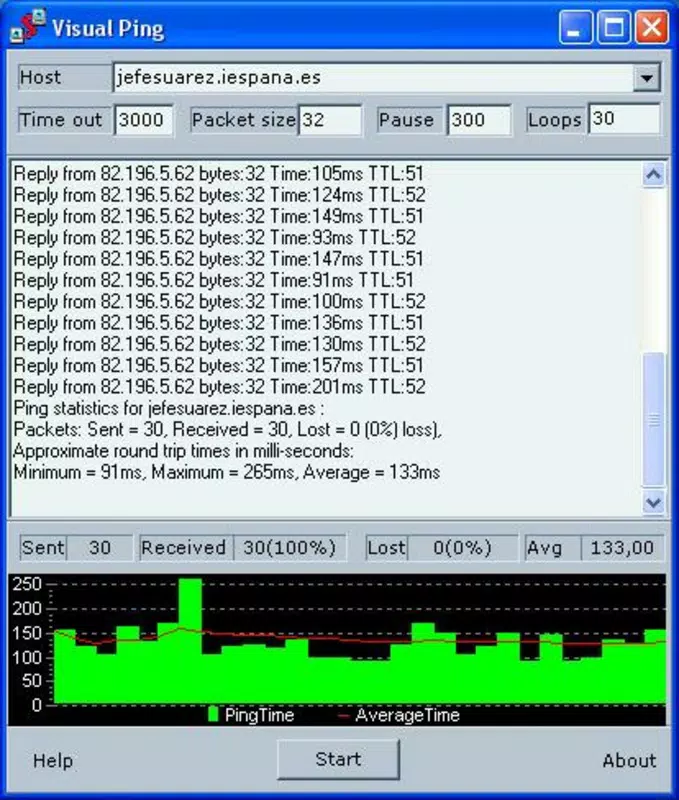
- Statistical Overview: The app generates detailed statistics, including the percentage of packets received and lost, as well as average round-trip time. This data enables users to evaluate connection quality and detect anomalies such as intermittent outages or high latency.
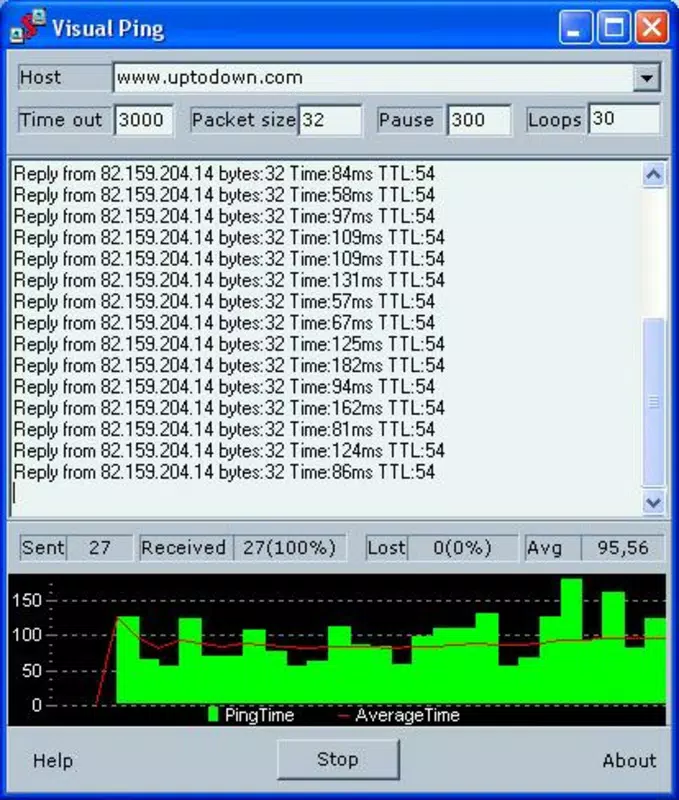
- Visual Graph Representation: A built-in graph plots ping results over time, with trial numbers on the X-axis and response times on the Y-axis. A red line indicates the average response time, offering an intuitive way to visualize trends and fluctuations in network performance.
- Network Monitoring Capability: Visual Ping supports continuous monitoring of multiple devices, making it a practical tool for tracking the status of servers, websites, and local network hosts. This feature is ideal for users who need to maintain consistent uptime and quickly respond to network failures.
For example, a remote worker could use Visual Ping to verify the stability of their connection to a corporate server throughout the day. A small business owner might monitor their website’s availability from different regions to ensure global accessibility. The app’s ability to combine real-time data with historical visualization makes it a versatile diagnostic utility for ongoing network health assessment.
Interface, UX & Performance
Visual Ping features a clean, functional interface focused on usability and clarity. The layout prioritizes essential controls—such as input fields for IP/domain entry and settings for ping parameters—ensuring quick access without clutter. Navigation is straightforward, with minimal steps required to initiate a test and view results.
The visual graph is well-integrated into the workflow, providing immediate feedback on performance trends. Users can interpret response times and packet loss at a glance, reducing the need for technical expertise to analyze raw data. The design emphasizes functionality over aesthetics, aligning with the app’s utility-focused purpose.
Although the developer did not list formal performance metrics, the app appears optimized for consistent operation across a range of mobile devices. It likely maintains responsiveness during extended monitoring sessions and handles data visualization efficiently. Stability is implied by the app’s long-term availability, though specific information on memory usage or battery impact was not disclosed. Overall, the user experience is efficient and purpose-driven, catering to users who value reliable diagnostics over flashy design elements.
Platform Compatibility & Technical Requirements
Visual Ping is available for Android and iOS platforms, supporting both major mobile operating systems. The app requires a compatible smartphone or tablet with access to network connectivity. The file size is approximately 12.4 MB, indicating a lightweight footprint suitable for most devices.
The developer did not specify minimum OS requirements or version compatibility details. It is recommended to check the app store listing for up-to-date compatibility information. No additional permissions or hardware dependencies were reported. The app’s lightweight nature suggests broad accessibility across older and newer devices, though users should verify system requirements through official distribution channels.
Pros and Cons
Pros
- Intuitive interface for network diagnostics
- Supports both IP addresses and domain names
- Provides statistical analysis of packet loss and latency
- Visual graph for real-time performance tracking
- Lightweight file size (12.4 MB)
- Effective for monitoring servers, websites, and local devices
Cons
- Developer did not provide OS version requirements
- No information on battery or memory usage
- Compatibility with older devices not confirmed
- Limited customization options beyond basic ping settings
- Visual design may appear outdated to some users
FAQ
Is Visual Ping free to download and use?
Yes, Visual Ping is available for download at no cost. Users can access core features without payment.
Can I use Visual Ping to monitor my website’s uptime?
Yes, by entering your website’s domain name, you can regularly ping it to assess availability and response time.
Does Visual Ping work on both Android and iOS?
Yes, the app is compatible with both Android and iOS platforms.
How often can I run a ping test?
There is no stated limit on the number of tests. Users can run ping checks as frequently as needed.
Is Visual Ping secure to use?
Yes, the app performs standard network diagnostics using standard protocols. It does not collect or transmit personal data.
Final Thoughts
Visual Ping stands out as a reliable, no-frills tool for network diagnostics on mobile devices. Its combination of customizable ping options, statistical reporting, and visual graphing makes it a valuable asset for anyone managing networked systems. While its interface may not reflect modern design trends, its functionality remains relevant and effective.
It is ideal for IT professionals, remote workers, and small business owners who need to monitor server health, website availability, or connection stability. The app’s lightweight nature and low resource usage ensure it runs smoothly on a wide range of devices.
Despite limited public details on technical specifications, its long-standing presence in the market speaks to its reliability. For users seeking a straightforward, secure way to assess network performance, Visual Ping delivers real value.
Download Visual Ping now


